

Automated workflows can take text marketing for car dealerships to the next level. In this article, we’ll explore three workflows that were specifically built to automate text messages for car dealers. These workflows are included as templates on Workbench, a sophisticated automated workflow builder powered by Trumpia.
You can access Workbench when you sign up for any of our Advanced plans, or you can try it when you sign up for a 14-day FREE trial. With Workbench, you can customize your marketing text messages and emails through an easy-to-use UI with drag-and-drop functionality. Workbench requires no coding knowledge, and includes pre-built templates you can start using right away.
Automated Text Message Workflows for Car Dealers
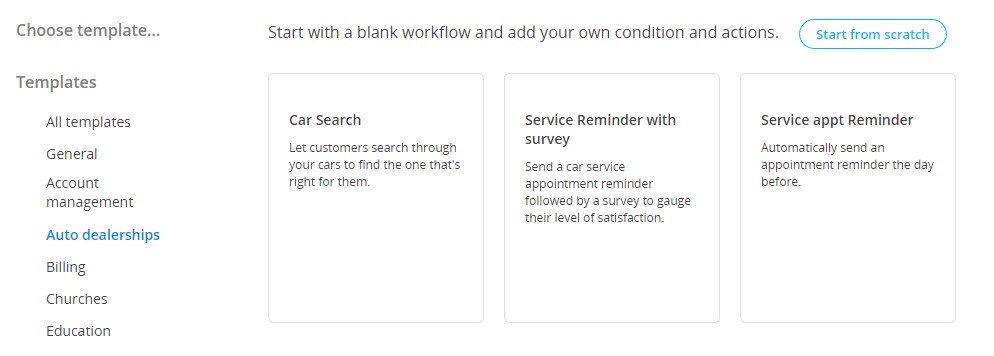
As explained before, Trumpia’s Workbench features built-in automated text message workflows. These workflows are separated into different industries; including auto dealerships. Here’s an overview on those workflows, and how they can help you sell more cars.
Car Search
With this workflow, your subscribers can search through the cars available in your inventory and get a notification if the one they’re looking for is available. After the first question in the workflow (‘What type of car are you searching for?’) the answer is filtered through Data Capture. This feature allows users to capture custom data fields and then trigger other specific questions.
Once those questions are answered, the information provided by the potential client through text messages can automatically determine if the car he or she is looking for is available. That’s when one of your sales people can contact the prospect, book an in-person visit and close the deal. This functionality can save both your prospects and you an incredible amount of time.
Service Reminder & Survey
With this automated workflow, you can send an SMS appointment reminder for those who signed up to get their car serviced; followed by an SMS survey to gauge satisfaction level. Using Workbench, appointment reminders and surveys can be automated to send after a certain time by simply dragging the element in the workflow and setting how long it should wait to send them.
In-person Service Appointment Reminder
This simple (yet effective) workflow sends people an appointment reminder the day before their visit. The advantage of using Trumpia’s Workbench is that appointment reminders include:
- Smart Targeting: which allows you to sort contacts and send messages based on previously set criteria. This helps you send more personalized reminders and make sure they’re received by those who really need them.
- Compliant Link Shortener: this tool is especially useful, for example, if the client needs to reschedule the visit. You can send a short link to your calendar attached to the reminder message.
- Multi-channel messaging: aside from text messaging, you can encompass other channels to provide an even more personalized experience. Send a voice message or an email along to your SMS reminder.
The Next Level in Text Marketing for Car Dealerships
Even though the workflows we explored in this article are pre-built on Trumpia’s Workbench, they’re fully customizable and give you complete liberty to edit, add, or remove whatever is necessary for you to send the right messages to the right people at the right time. You can also create your own Workflows from scratch and add your own conditions and actions.
If you’ve never used SMS marketing automation before and are unsure on how to do it don’t worry, we got you covered! Trumpia offers onboarding and training to make sure you or your team members start using our software correctly right away. For more information, call or text 1-888-707-3030.